
Solarsat guide
External antennas for 4G and 5G home broadband
An outdoor antenna can help a mobile broadband router receive a more useful signal, but it is not automatically better than moving the router. Start with repeatable indoor tests, then assess the antenna, cable route and network together. The aim is a dependable connection rather than an impressive reading from one speed test.
Phones and email Monday to Saturday, 8:30am to 6pm. Showroom visits by appointment.
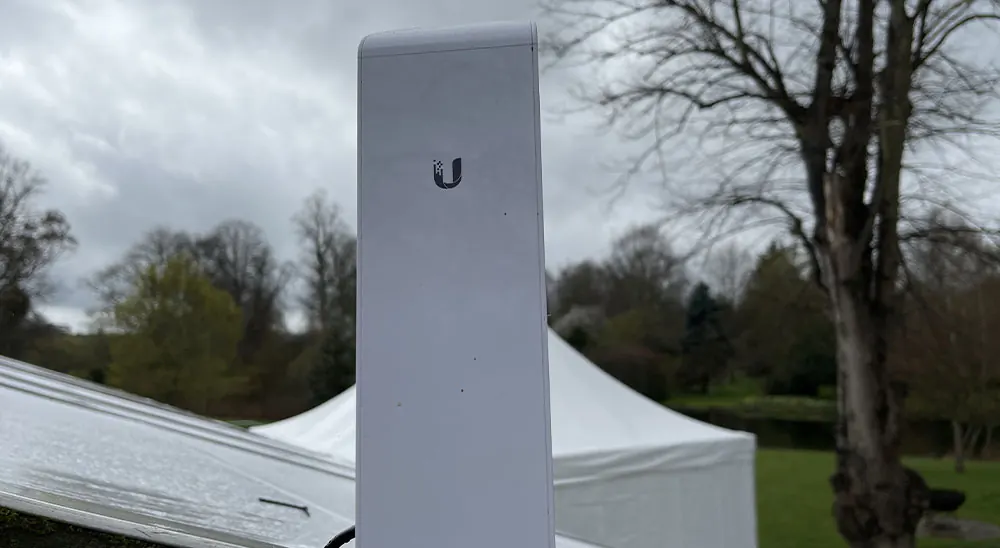
Test indoor reception before buying equipment
Try the router at several safe indoor positions, including different windows and an upstairs room where available. Keep it clear of metal objects and allow it to settle after each move. Some coated glazing weakens mobile signals, so the nearest window is not always the best position. Do not balance equipment outside to improvise a test.
Use a computer connected by Ethernet where possible. This separates the mobile connection from indoor Wi-Fi performance. Record download, upload and latency at similar times across several days, including the busy evening period. Check signal quality readings in the router interface as well as bars, noting their labels because manufacturers present them differently.
Keep the same SIM, device and test method throughout the comparison. If moving the router gives stable results, running a data cable back to your home network may be simpler than fitting an antenna. An antenna cannot remove network congestion or a mobile plan restriction.
Choose an antenna for the network and router
A directional antenna concentrates reception towards a chosen direction. It needs careful positioning and testing, especially where several masts or reflected signals are involved. An omnidirectional antenna receives around a broader area and can suit uncertain or changing serving directions. Neither design is universally better, and antenna gain alone does not settle the choice.
Check the router manual for external antenna support, supported frequency bands, connector types and which ports serve which radios. A socket may be intended for Wi-Fi rather than mobile reception. Some routers use external antennas for only certain mobile bands or require a setting change before those sockets become active.
MIMO uses multiple signal paths. A compatible antenna may have several separate leads that must connect to the correct router ports. Do not assume that a two-lead antenna replaces every internal antenna in a router with more radio paths. Confirm that the SIM, plan and router support the network and service you intend to use.
Balance mounting position against cable loss
A clear path towards the serving mast can help, but a coverage map is only a starting point. Buildings, trees, terrain and the network's chosen bands affect reception. The nearest visible mast may not carry your provider or offer the best usable connection. Test a proposed direction rather than relying on appearance.
Higher is not automatically better once cable losses and safe access are considered. Coaxial cable loses signal, with the amount depending on cable construction, length and frequency. Long runs, unnecessary adapters and unsuitable connectors can cancel out an antenna's benefit. Plan a practical route before choosing the final mounting location.
Use compatible connectors and follow the equipment instructions for tightening, support and bend radius. Where a long coaxial route would be needed, consider whether relocating compatible equipment closer to the antenna and extending Ethernet is more appropriate. Outdoor routers need suitable ratings, power arrangements and environmental protection, not simply a sheltered position.
Protect the installation and measure the result
External fixings must suit the wall and the antenna's wind loading. Keep clear of overhead lines and check permissions where relevant. Provide appropriate cable entry sealing, weather protection at connections and a drip loop where specified. Avoid routes that trap water or leave cables rubbing against sharp edges.
An antenna is not lightning protection. Earthing, bonding and surge protection requirements depend on the equipment, building and exposure. Follow manufacturer guidance and obtain competent electrical advice where needed. Do not improvise a connection to nearby pipework or assume that a plug-in protector makes an exposed installation safe.
After installation, repeat the original wired tests at comparable times. Record signal quality, stability, upload performance and latency as well as download results. Change one variable at a time when adjusting direction. Keep a record of the chosen ports, settings and cable route so later troubleshooting has a useful baseline.
Common external antenna mistakes
Buying from a gain figure without checking operating bands is a common mistake. So is choosing connectors by appearance, adding several adapters or extending thin coaxial cable until the route happens to reach. Confirm the complete antenna and cable arrangement against the router documentation before ordering.
Another mistake is judging the result from full signal bars or a single quiet morning test. A stronger signal can still produce disappointing performance when interference or cell loading is the limiting factor. Compare normal household tasks and busy periods rather than treating the highest observed speed as an expected daily result.
When to hire a professional installer
Bring in an installer when the useful mounting position needs work at height, the cable route is difficult or router compatibility is unclear. A site assessment can compare feasible locations and establish whether an outdoor antenna is worth pursuing before permanent holes or fixings are made.
Agree what will be tested and documented. Useful handover information includes antenna orientation, connected ports, router settings and before-and-after measurements. If the results point to network congestion rather than reception, discuss other connection options instead of repeatedly changing antennas. No installer can promise a particular mobile speed from signal strength alone.
Have a question about your own property? Contact our Mildenhall team.
Related services
Services this guide covers
Rural broadband
Fast, reliable internet for rural homes and businesses using 4G, 5G and Starlink, with planning, installation and support.
Find out more
Data and network cabling
Wired network sockets, data cabinets and structured cabling for offices and homes, planned for growth and easy to maintain.
Find out moreWi-Fi and networking
Whole-property Wi-Fi, outdoor coverage, wired network points, data cabinets and wireless links between buildings.
Find out more
FAQs
Frequently asked questions
Want advice for your own home or business?
Call our Mildenhall team or send an enquiry and we will talk through the options.
Enquiries
Ask us a question or get a quote
Tell us a little about your property and what you need. We will get back to you to talk it through.
- 01638 515551
- info@solarsat.co.uk
- Phones and email Monday to Saturday, 8:30am to 6pm
- 8 High Street, Mildenhall, Suffolk IP28 7EQ. Showroom visits by appointment.