
Solarsat guide
Hiding AV boxes in a cupboard or equipment rack
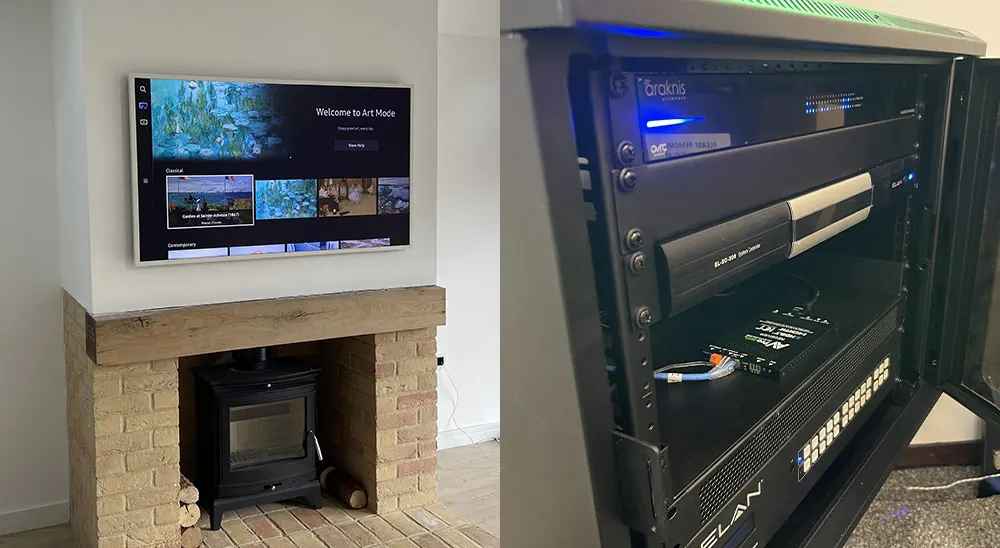
A cupboard can make a living room look calmer, but closing a door on several active devices can create heat and control problems. Receivers, consoles and network equipment need sensible airflow, cable access and room for maintenance. Plan the equipment location before building shelves or concealing the connections.
Phones and email Monday to Saturday, 8:30am to 6pm. Showroom visits by appointment.
List equipment and measure real dimensions
Write down every device that will be stored, including the receiver, streaming unit, games console, network switch, set-top box and any control hub. Check the manufacturer’s dimensions and ventilation clearances. Allow for projecting plugs, cable bends and the space needed to lift a device out for service.
Measure shelves and cupboard openings, not just the available floor area. A device may fit inside but be impossible to slide through the door or connect once placed. Consider shelf depth, door hinges and whether the back panel can be removed or accessed without damaging the furniture.
Plan for future additions without filling every remaining space. Equipment changes over time, and a tightly packed cupboard is difficult to keep cool and maintain. Leave an accessible position for a likely upgrade and avoid stacking devices unless their instructions permit it.
Give heat a way to escape
Active electronics release heat, particularly amplifiers, receivers and games consoles. A closed, unventilated cupboard can raise the temperature and shorten equipment life or trigger protective shutdown. Follow each manufacturer’s clearance guidance and consider how air will enter and leave the enclosure.
Passive openings may be enough for a small, low-power installation, but dense equipment or a restricted cupboard may need planned ventilation. Do not direct hot exhaust back towards an intake, and avoid placing a heat-producing component directly on top of another without checking instructions.
If using a fan, consider noise, airflow direction, dust and access for cleaning. A fan is not a substitute for adequate space or clear vents. Check cupboard temperatures during extended use and adjust the arrangement if equipment becomes unusually hot or reports an error.
Organise cables and power safely
Group cables by purpose and label both ends so a device can be disconnected without tracing a bundle. Keep signal leads long enough for service access but not so loose that they tangle around fans or hinges. Use suitable ties that do not crush or tightly bend cables.
Avoid overloading sockets or creating a chain of extension leads. Keep power supplies accessible and do not conceal damaged plugs or connectors behind a fixed panel. If additional outlets or electrical work are needed, arrange them appropriately rather than improvising a permanent arrangement inside furniture.
Separate equipment connections in a way that makes the system easy to understand. Leave room to unplug a source, access reset controls and identify the correct input. Photographing or documenting the final connections can help with future troubleshooting, provided the notes are kept current.
Choose a rack or cupboard arrangement
A purpose-designed equipment rack can provide predictable shelf spacing, cable routes and access. It may suit a larger system with several components, but check its dimensions, load capacity and ventilation provisions against the actual devices. A rack should remain stable and be positioned where it can be serviced.
A cupboard can blend equipment into existing furniture, provided it has adequate depth and airflow. Removable rear panels or ventilation openings can improve access, but maintain a tidy finish and ensure openings do not expose cables to damage. Check that doors open fully and do not press against connected leads.
Choose a location that balances appearance with convenience. A remote cupboard may require longer signal cables or control arrangements, while an adjacent cabinet may keep connections simple. Consider noise from fans and equipment, especially if the cupboard is near a seating or sleeping area.
Make control and servicing straightforward
Infrared remotes may need a clear path to equipment, while radio-frequency or network control may work differently. Confirm how each device is operated before hiding its front panel. If an external control receiver is required, position it where it can receive commands and avoid placing it behind metalwork.
Label rack positions and cable ends, and keep a simple connection plan with the equipment. Leave enough access to check status lights and reach buttons without moving heavy components. A tidy installation should not turn a basic restart or input change into a furniture dismantling exercise.
Review the arrangement after everything is connected and running. Check temperatures, cable strain, fan noise and remote operation during normal use. Make adjustments before concealing the cupboard contents, and schedule access for dust removal and occasional inspection of plugs and ventilation paths.
Have a question about your own property? Contact our Mildenhall team.
Related services
Services this guide covers
Audio-visual and home cinema
TV wall mounting, media walls, home cinema, multi-room music and commercial AV, designed and installed by our own team.
Find out moreHome cinema installation
Dedicated cinema rooms and living room cinema set-ups, with the right screen, surround sound and one-touch control.
Find out moreMedia wall installation
AV design, wiring and installation for media walls, planned with your builder or joiner so the screen, sound and equipment fit.
Find out more
FAQs
Frequently asked questions
Want advice for your own home or business?
Call our Mildenhall team or send an enquiry and we will talk through the options.
Enquiries
Ask us a question or get a quote
Tell us a little about your property and what you need. We will get back to you to talk it through.
- 01638 515551
- info@solarsat.co.uk
- Phones and email Monday to Saturday, 8:30am to 6pm
- 8 High Street, Mildenhall, Suffolk IP28 7EQ. Showroom visits by appointment.