
Solarsat guide
Matching CCTV resolution and lenses to the view
A camera can produce a large, sharp-looking picture without recording the detail you actually need. Resolution matters, but so do lens choice, distance, lighting and mounting position. Start with the subject you want to see, then work backwards to the camera and its view.
Phones and email Monday to Saturday, 8:30am to 6pm. Showroom visits by appointment.
What 1080p and 4K tell you
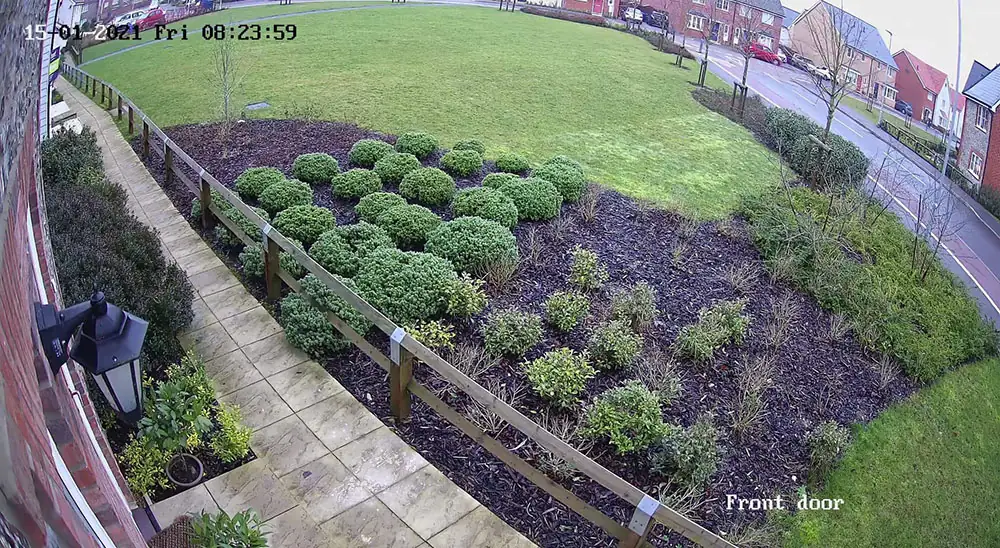
A typical 1080p image contains 1920 by 1080 pixels. Standard 4K UHD contains 3840 by 2160, giving four times as many pixels across the complete picture. That extra information can help when the lens, lighting, recording settings and subject position also support the detail you want.
The important measure is how many of those pixels fall on the target. Spread the same image across a much wider scene and each person occupies a smaller part of it. A high-resolution overview of an entire yard may reveal less facial detail than a tighter view of one entrance.
Resolution labels therefore cannot establish a reliable identification distance on their own. Ask to assess the actual recorded image at the relevant position. Subject movement, compression, weather and lighting all affect what remains visible when you pause or enlarge a frame.
Choose overview or identification before the lens
An overview camera helps you understand what happened and where people moved. A detail view concentrates on a particular approach, doorway or other useful point. One camera may not do both jobs well, especially where a broad frontage includes subjects at very different distances.
On the same sensor format, a shorter focal length generally gives a wider angle, while a longer focal length narrows the view. Wider coverage can be useful, but it spreads available pixels across more ground. A narrower view gives more attention to a smaller area and can miss activity outside it.
Choose the scene boundaries deliberately. Mark the nearest and furthest positions that matter, and consider where a person will be facing. A camera looking mainly at the tops of heads may offer a good overview without providing the facial view you hoped to obtain.
Understand fixed and varifocal lenses
A fixed lens has a set focal length. Its usefulness depends on choosing the right field of view before installation. Moving the camera or changing the model may be necessary if the resulting frame is too wide or too tight for the task.
A varifocal lens allows its focal length to be adjusted within a stated range. This helps an installer frame a gate or entrance more precisely from the available mounting position. Some adjustments are manual and some are motorised, depending on the camera. Neither arrangement removes the need to check focus.
Optical adjustment changes how the scene is projected onto the sensor. Digital zoom enlarges part of an existing image and does not recover detail that was never recorded. Allow some practical margin around the target so ordinary movement does not immediately carry it out of frame.
Balance night performance with recording and storage
More pixels do not automatically produce a better night image. Sensor design, sensor size, lens aperture and available light all matter. A camera may show an apparently bright scene by using a slower shutter, yet moving people can become blurred. Judge movement rather than a still driveway alone.
Infrared illumination can help in darkness, but nearby walls, soffits, foliage and cobwebs can reflect light towards the lens. Headlights and contrasting bright areas create different challenges. Check the final view after dark and consider whether suitable additional lighting would improve the scene.
Higher resolution can increase storage and network demands, although frame rate, compression, image activity and quality settings also affect the result. Agree how long recordings need to remain available and size storage accordingly. Reducing quality too aggressively to fit a smaller drive can undermine the reason for choosing extra resolution.
Common mistakes to avoid
Do not buy every camera at the highest available resolution without a view plan. Different positions may need different lenses and recording settings. A doorway and a broad garden overview are separate tasks, even when both cameras belong to the same recording system.
Mounting high simply to discourage interference can leave an unhelpful viewing angle. Equally, mounting too low may expose equipment to damage or obstruction. Positioning needs to balance the useful view, safe fixing and access for maintenance. Look for branches and seasonal growth as well as permanent obstructions.
Avoid judging performance only through a small phone preview. Review exported footage at its recorded quality on a suitable screen. Test a person walking through the relevant area in daylight and after dark. Check focus and motion detail rather than deciding from a static showroom image.
When to hire a professional installer
A professional survey is useful when you need detail at a particular point, face difficult lighting or have limited mounting options. It is particularly valuable where a broad area tempts you to ask one camera to cover everything. Separate overview and detail views may be a more realistic design.
Explain the outcome you need without starting with a preferred megapixel number. Ask the installer to discuss view width, likely subject size and night conditions together. Any expectation about recognition or identification should be assessed against the actual scene, not presented as a universal distance claim.
At handover, review both live and recorded images, including the areas that matter most. Confirm how to check focus, export original footage and recognise a changed view. Keep expectations practical: no camera can guarantee a usable face when a subject turns away or the view is obstructed.
Have a question about your own property? Contact our Mildenhall team.
FAQs
Frequently asked questions
Want advice for your own home or business?
Call our Mildenhall team or send an enquiry and we will talk through the options.
Enquiries
Ask us a question or get a quote
Tell us a little about your property and what you need. We will get back to you to talk it through.
- 01638 515551
- info@solarsat.co.uk
- Phones and email Monday to Saturday, 8:30am to 6pm
- 8 High Street, Mildenhall, Suffolk IP28 7EQ. Showroom visits by appointment.