
Solarsat guide
Communal TV aerial systems for flats and guest houses
A shared aerial system can provide television outlets to multiple flats or guest rooms without a separate roof aerial for every occupier. The design has to balance reception, distribution losses, access and the needs of different users. A system that works for one television may not be suitable for a whole building, so planning and testing at individual outlets are essential.
Phones and email Monday to Saturday, 8:30am to 6pm. Showroom visits by appointment.
Start with the building and user needs
Before selecting equipment, establish how many flats or rooms need service and where their television points are located. A guest house may have changing occupancy and a need for consistent reception across rooms, while a block of flats may need a durable arrangement with clear responsibilities for shared equipment. Identify whether users need terrestrial television, satellite feeds or both, and whether existing cabling can be reused.
Survey the building routes, risers, plant areas and likely aerial mounting positions. Long cable runs and multiple floor levels affect signal distribution, while fire stopping and access restrictions can affect installation planning. A survey should also establish where equipment can be housed securely and how engineers can reach it later. The system should be designed around actual routes rather than a notional number of televisions.
Aerial and headend choices
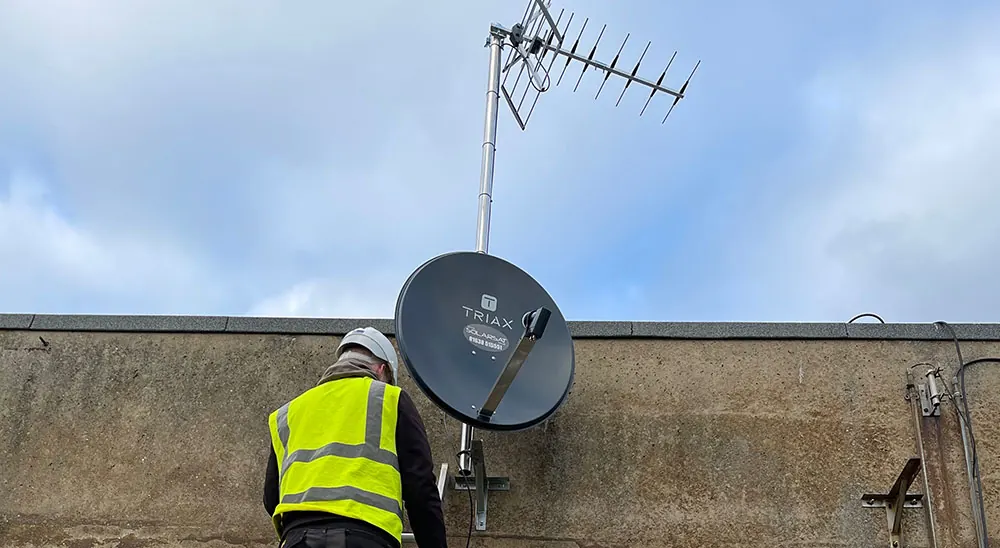
The aerial must suit the local transmission conditions and provide a clean input for the distribution system. Reception should be measured at the proposed aerial position, with attention to signal quality as well as level. A high reading alone does not confirm a dependable input if the signal is distorted or affected by reflections. The aerial should be mounted securely and connected with suitable cable and weather-resistant fittings.
A headend or distribution arrangement takes the incoming services and makes them available to building outlets. The exact equipment depends on whether the system carries terrestrial television, satellite signals or a combination. Components should be compatible and configured for the intended service, with enough capacity for the planned outlets. Avoid specifying equipment solely by the number of sockets; the signal paths and required functions also matter.
Distribution and outlet performance
Every splitter, connector and cable length affects the level at a television point. A communal design therefore needs to account for the furthest outlets as well as those close to the equipment. Equal-looking sockets can receive different performance if the routes differ. Testing representative points, including the longest routes, helps identify imbalance before residents or guests rely on the system.
Cables should be labelled and routed neatly, with connections protected and accessible where possible. Poorly terminated plugs or damaged cable can create intermittent faults that are difficult to trace across a large building. Keep shared equipment ventilated in line with its requirements and avoid storing unrelated items in front of it. A simple circuit schedule can save time when a room reports a problem.
Responsibility and maintenance
Agree who is responsible for the shared aerial, distribution equipment and internal connections. In a block, this may involve a property manager or residents' organisation; in a guest house it may sit with the building operator. Clear responsibility helps prevent conflicting alterations, such as an unapproved amplifier or splitter being added to a communal line. Keep details of the equipment and any configuration changes together.
Routine checks can include visual inspection of accessible connections, confirmation that equipment is powered and ventilation is clear, and a record of reported faults. Outdoor mounts and cable entries should be inspected where safe access is available. If only one outlet has a problem, local cabling may be responsible; if many outlets fail together, the shared input or headend is a more likely starting point. Diagnose the extent before arranging changes.
Upgrades and fault reporting
When renovating or adding rooms, confirm that the existing system has spare capacity and that new cable routes can be installed without compromising building requirements. A planned upgrade can provide a better result than connecting extra branches to an already loaded network. Explain any service changes to occupants and identify which sockets are affected, particularly if television arrangements differ between rooms.
Ask users to report the room or outlet, the channels affected and whether the fault is constant or intermittent. This detail can help separate a local television issue from a shared system fault. Avoid asking residents to alter communal equipment, since one change can interrupt service to others. A documented test and a clear handover make future maintenance more predictable for owners and installers alike.
Have a question about your own property? Contact our Mildenhall team.
Related services
Services this guide covers
FAQs
Frequently asked questions
Want advice for your own home or business?
Call our Mildenhall team or send an enquiry and we will talk through the options.
Enquiries
Ask us a question or get a quote
Tell us a little about your property and what you need. We will get back to you to talk it through.
- 01638 515551
- info@solarsat.co.uk
- Phones and email Monday to Saturday, 8:30am to 6pm
- 8 High Street, Mildenhall, Suffolk IP28 7EQ. Showroom visits by appointment.