
Solarsat guide
Fixing Wi-Fi dead spots in large or thick-walled homes and outbuildings
If the Wi-Fi is strong in the hallway but vanishes in the kitchen, the garden office or the barn, the router is rarely the whole story. This guide explains what causes dead spots and the three main ways to fix them properly.
Phones and email Monday to Saturday, 8:30am to 6pm. Showroom visits by appointment.

Why thick walls stop Wi-Fi
Wi-Fi is a radio signal, and dense materials absorb it. Stone, solid brick, concrete blocks and the rubble-filled walls found in older cottages and farmhouses can cut the signal sharply with every wall it passes through. Foil-backed insulation, underfloor heating, mirrors and large metal appliances add to the problem.
The faster 5GHz band, which gives the best speeds, is the most easily stopped. That is why a phone can show a connection in a far room while web pages crawl. Large homes have the same issue through sheer distance, even with modern lightweight walls.
Why plug-in extenders rarely solve it
Plug-in extenders are the most common first attempt at fixing a dead spot. They sit in a socket, pick up the existing signal and repeat it. The catch is that an extender can only repeat what it receives. Placed in the weak area it hears very little, and placed nearer the router it does not reach far enough.
Most extenders also cut available speed, because they use the same radio to listen and to repeat, and many create a separate network name so devices hang on to a weak connection instead of switching. Several extenders added over the years can leave a house with a tangle of networks that all work a little and none work well.
Replacing them with a planned system is usually the point where Wi-Fi stops being a daily frustration.
Mesh systems
A mesh system uses several units placed around the home that pass the signal between them and appear as one network. They are easy to set up and a clear improvement on plug-in extenders, which create a second network and often halve the speed.
Mesh works best when each unit can still hear its neighbour well. In a house with thick internal walls, the wireless link between units becomes the weak point, so the far units have a strong signal from themselves but little speed behind it. Many mesh units can be connected to each other with network cable, which removes that weakness.
Wired access points
The most reliable fix for a large or solid-walled property is a set of access points, each connected back to the router or a network switch with a data cable. Because every access point has its own wired connection, it delivers full speed regardless of how many walls lie between it and the router.
Ceiling-mounted access points can be positioned exactly where coverage is needed and managed as one system, so phones and laptops move between them smoothly. A planned layout replaces guesswork: fewer, well-placed access points often outperform a scattering of consumer devices.
Checking coverage before you buy
Guesswork is expensive, so it pays to understand the problem first. Walk around the property with a phone running a simple Wi-Fi analyser app and note where signal and speed drop. Test at the times you actually use the network, as evenings are often busiest.
Look also at how the broadband arrives and where the router sits. A router in a cupboard at one end of the house, or tucked behind the TV, is working at a disadvantage before any walls get involved. Sometimes moving the router, or giving it a clear spot near the middle of the home, makes a noticeable difference on its own.
For larger or older properties, a professional survey maps coverage room by room and outside, so the number and positions of access points are planned rather than guessed.
Garden offices, barns and outbuildings
Getting Wi-Fi to a separate building is a different problem. A signal sent from the house rarely gets through two external walls and across a garden or yard in any useful state.
Where trenching is practical, a buried data cable gives the most dependable link. Where it is not, a point-to-point wireless bridge sends the connection between two small dishes mounted on each building. With clear line of sight it can carry a fast connection over a long distance without digging. Once the connection arrives, an access point inside the building, or outdoors to cover the yard, spreads it where it is needed.
When to run cable
Cable is worth considering whenever walls are thick, distances are long or a device stays in one place. Smart TVs, games consoles, desktop computers and home office setups all benefit from a wired connection, and every device taken off the Wi-Fi leaves more capacity for phones and tablets.
The best time to cable is during a renovation, an extension or before decorating, when routes are easy to reach. Even in a finished home, neat routes through lofts, under floors and inside cupboards are usually possible. We survey Wi-Fi coverage and design networks for homes and businesses around Mildenhall. Call us or send an enquiry to arrange a visit.
Have a question about your own property? Contact our Mildenhall team.
Related services
Services this guide covers

Wi-Fi and networking
Whole-property Wi-Fi, outdoor coverage, wired network points, data cabinets and wireless links between buildings.
Find out more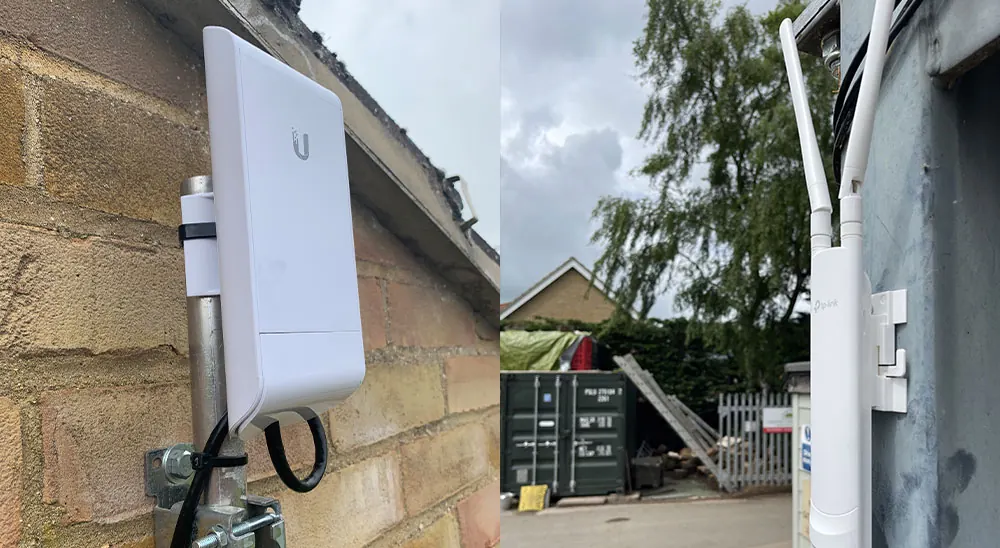
Point-to-point Wi-Fi links
Wireless bridges that carry your network to a garden office, workshop, barn or second building without digging a trench.
Find out moreData and network cabling
Wired network sockets, data cabinets and structured cabling for offices and homes, planned for growth and easy to maintain.
Find out more
FAQs
Frequently asked questions
Want advice for your own home or business?
Call our Mildenhall team or send an enquiry and we will talk through the options.
Enquiries
Ask us a question or get a quote
Tell us a little about your property and what you need. We will get back to you to talk it through.
- 01638 515551
- info@solarsat.co.uk
- Phones and email Monday to Saturday, 8:30am to 6pm
- 8 High Street, Mildenhall, Suffolk IP28 7EQ. Showroom visits by appointment.