
Solarsat guide
Home network cabling and data sockets: a practical guide
Wi-Fi is great for phones and tablets, but anything that stays in one place works faster and more reliably on a cable. This guide explains where wired network sockets make the biggest difference, how data cabinets work and what to plan before decorating.
Phones and email Monday to Saturday, 8:30am to 6pm. Showroom visits by appointment.

Why wired network cabling still matters
Even with modern Wi-Fi standards, wireless signals share airtime, lose speed through thick walls and suffer interference from neighbouring networks. A wired Cat6 ethernet cable delivers full, consistent speed with low latency and zero wireless dropouts.
Every fixed device you plug into a wall socket frees up Wi-Fi capacity for the phones, laptops and tablets that genuinely need to move around the house.
For anyone working from home on video calls, transferring large files or streaming 4K television without buffering, a dedicated wall socket removes the guesswork and slowdowns that plague crowded wireless channels.
Where to put network sockets in a home
The highest-value locations are behind the main living-room television and AV rack, in any home office or study desk, and in teenagers' bedrooms where gaming consoles or PCs sit.
Just as important are ceiling or high-wall data points for wired Wi-Fi access points, plus external or loft data points for PoE CCTV cameras and point-to-point wireless bridges to a garden office or barn. Running twin sockets to busy rooms such as the lounge and office avoids cluttering desks with extra desktop switches.
Do not forget utility rooms, garages and loft conversions. Adding a single extra run while floorboards are up or walls are open takes minutes, whereas trying to fish a cable across a finished house a year later takes far more effort.
Data cabinets, patch panels and PoE switches
All network cables run back in a star layout to one central hub, usually a utility room, under-stairs cupboard or loft. Terminating those cables neatly into a patch panel inside a compact wall-mounted data cabinet keeps everything labelled, protected and easy to troubleshoot.
A PoE (Power over Ethernet) network switch inside the cabinet sends both data and electrical power down a single network cable to ceiling Wi-Fi access points and security cameras, avoiding the need for plug-in power adapters in every room.
Make sure the cupboard or loft space you choose has a double mains socket nearby and enough airflow so the router, switch and any CCTV recorder stay cool year-round.
First-fix cabling versus retrofitting
Installing network cabling during an extension, loft conversion or renovation is quick and completely hidden. In a finished home, neat routes are still very achievable by using loft voids, cupboards, eaves spaces or discreet external UV-rated cabling.
If you are having an electrician rewire a room or build an extension, asking for data cabling at the same stage avoids lifting new carpets or cutting freshly skimmed plasterboard a few months later.
Marking socket locations on the room plan alongside power outlets ensures desks, TV units and ceiling access points line up cleanly once furniture goes in.
What affects cost and mistakes to avoid
Cost depends on the number of data points, cable route difficulty, whether a data cabinet and PoE switch are included, and whether walls are open or finished.
Common mistakes include using cheap copper-clad aluminium (CCA) cable instead of solid pure copper Cat6, which causes PoE failures and brittle terminations; running indoor PVC cable outside where sunlight cracks the sheath; and skipping cable testing and labelling before closing up walls.
Leaving cables dangling loose out of a wall without proper RJ45 wall modules or patch panels also leads to broken clips and intermittent connections over time.
Taking a few minutes to label both ends of every cable run saves hours of guesswork whenever you move a router, add a switch or trace a room socket years later.
Leaving a small service loop of spare cable inside the cabinet also makes future re-termination neat and stress-free.
When to hire a network cabling installer
A professional installer uses solid copper cable, keeps data routes separated from mains wiring, terminates every socket cleanly, tests every run with a cable certifier or tester and leaves a tidy, labelled cabinet ready for years of use.
They can also plan your ceiling Wi-Fi access points and CCTV camera points at the same time so every low-voltage cable in the house terminates neatly in one place.
Have a question about your own property? Contact our Mildenhall team.
Related services
Services this guide covers
Data and network cabling
Wired network sockets, data cabinets and structured cabling for offices and homes, planned for growth and easy to maintain.
Find out moreWi-Fi and networking
Whole-property Wi-Fi, outdoor coverage, wired network points, data cabinets and wireless links between buildings.
Find out more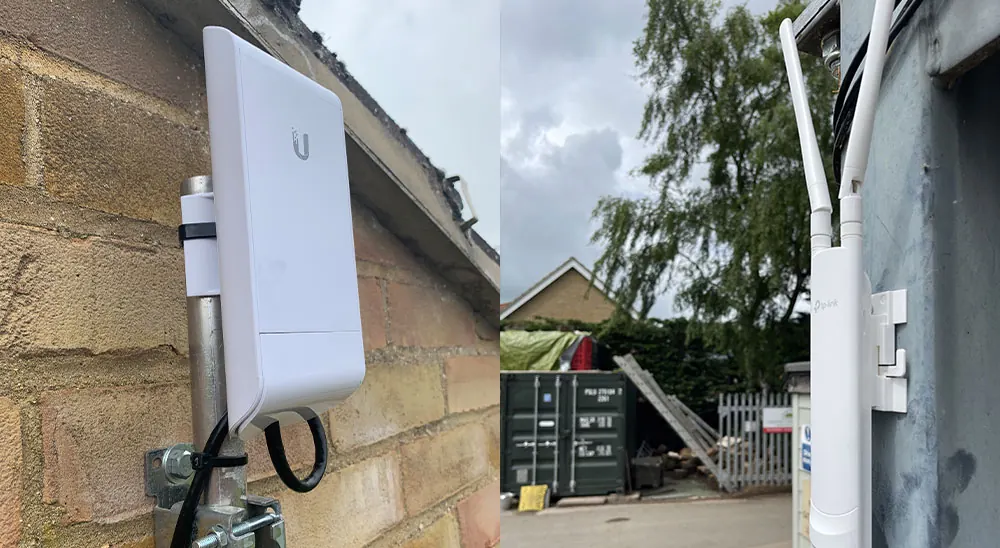
Point-to-point Wi-Fi links
Wireless bridges that carry your network to a garden office, workshop, barn or second building without digging a trench.
Find out more
FAQs
Frequently asked questions
Want advice for your own home or business?
Call our Mildenhall team or send an enquiry and we will talk through the options.
Enquiries
Ask us a question or get a quote
Tell us a little about your property and what you need. We will get back to you to talk it through.
- 01638 515551
- info@solarsat.co.uk
- Phones and email Monday to Saturday, 8:30am to 6pm
- 8 High Street, Mildenhall, Suffolk IP28 7EQ. Showroom visits by appointment.