
Solarsat guide
Design a PA system people can understand
An announcement has only done its job when listeners understand the words. Turning an amplifier up will not necessarily help. Clear speech depends on speaker positions, room acoustics, microphone technique and sensible control of where messages go. Define those requirements before choosing amplifier power or counting loudspeakers.
Phones and email Monday to Saturday, 8:30am to 6pm. Showroom visits by appointment.
Start with intelligibility and even coverage
Walk the spaces where people need to hear announcements and note background noise, ceiling heights and typical occupancy. A reception desk, workshop and quiet corridor present different conditions. Speech needs to stand clearly above local noise without becoming uncomfortable nearby. Describe the listening task as well: a short name call is different from detailed instructions that listeners must follow first time.
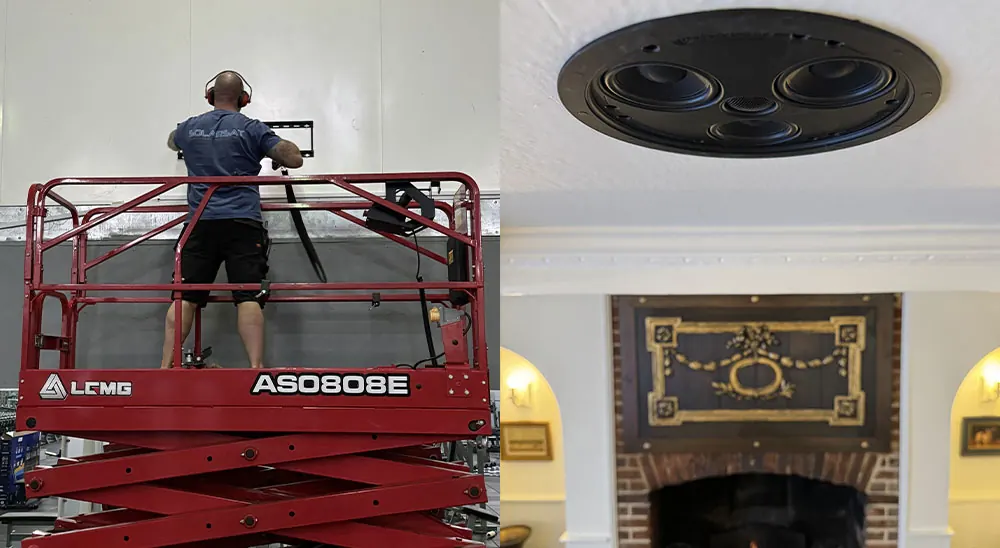
Several appropriately positioned speakers running at modest levels often give more even coverage than a few units driven loudly from one end. This is not simply a rule to add speakers everywhere. Their coverage patterns, spacing and interaction matter. Long rooms or linked areas may need delay alignment so listeners do not hear confusing repeats. Speaker selection and placement should follow the room layout rather than convenient cable routes alone.
Control reflections and choose microphones carefully
Hard floors, glazing and bare walls reflect sound, allowing previous syllables to linger over the next ones. Increasing volume raises these reflections too. Consider quieter ventilation, appropriate acoustic treatment and more direct speaker coverage before adding power. Soft furnishings can help some rooms, but treatment should suit the building's use and any relevant material requirements. Assess conditions with people present as well as in an empty space.
A handheld microphone suits occasional announcements if users keep a consistent distance. A headset can maintain distance for a moving presenter, while a lapel microphone is discreet but more exposed to clothing noise and changing pickup. Desk microphones suit fixed paging points. Feedback occurs when amplified sound returns to an open microphone. Positioning, directional pickup, sensible gain and keeping unused microphones closed matter more than simply adding feedback processing.
Define zones and announcement priorities
Make a zone schedule showing which areas need independent music, volume or announcements. Group spaces by use, not just floor plan. Staff may need to page a store room without interrupting a meeting area, while another message needs to reach several zones together. Label controls in language that users recognise, and decide who may make an all-zone announcement before programming the system.
Background music should step back when speech begins, either by muting or reducing level according to the agreed priority. Define what happens if two paging points are used together and whether a chime is useful. A general music and paging system should not be assumed suitable for emergency voice alarm duties. Where emergency announcements form part of the requirement, obtain specialist advice and establish that separate design brief explicitly.
Allow for outdoor spaces and different listeners
Outdoor speakers and connections need environmental suitability for their actual exposure, including rain, sunlight and temperature. A covered location is not necessarily dry. Think about wind noise at microphones, secure fixings, cable entry and where sound travels beyond the intended audience. Open air removes some room reflections but does not remove background noise or make unlimited volume appropriate. Aim coverage towards listeners rather than neighbouring properties.
Place everyday controls where authorised users can reach and read them, with clear labels and an obvious speech level setting. Where the audience or venue calls for hearing assistance, consider suitable options with specialist input rather than assuming louder speakers provide access. Microphone use, clear speaking and visual information can also matter. Confirm what existing hearing assistance equipment supports and how it will be checked during normal operation.
Common PA planning mistakes
Choosing amplifier wattage before checking speaker coverage often produces an uneven system that is loud near the front and unclear elsewhere. Another mistake is treating music quality as proof of speech clarity. Music may sound acceptable while consonants are lost in reverberation. Test spoken announcements using unfamiliar sentences, not only a familiar song or a quick count into the microphone beside the control rack.
Avoid giving every user unrestricted gain controls or relying on one person to remember an undocumented switching sequence. Wireless microphones also need suitable frequency arrangements, battery routines and any required licensing checks. Do not overlook the quietest and noisiest operating conditions. A setting suitable during cleaning may be wrong when machinery starts, doors open or the room fills with people. Record workable settings instead of repeatedly adjusting by guesswork.
When to hire a professional installer
Use professional help for multiple zones, difficult acoustics, outdoor coverage or systems with several microphones and priority rules. Existing speaker wiring also needs identification before connecting a new amplifier. Different distribution arrangements are not interchangeable simply because their cables look similar. An installer can assess loads, routes, equipment compatibility and maintenance access alongside the listening requirements, rather than treating the job as a loudspeaker replacement exercise.
At handover, test every zone from the places listeners actually occupy, with realistic background noise where practical. Check microphone movement, feedback margin, paging priority and the return to background music. Ask regular staff to operate the controls themselves. Keep a zone map, agreed settings and a simple fault procedure so a flat microphone battery or muted input does not become a building-wide communication problem.
Have a question about your own property? Contact our Mildenhall team.
Related services
Services this guide covers

PA system installation
Public address systems for offices, warehouses, venues and outdoor spaces, with clear announcements, zones and simple control.
Find out more
Audio-visual and home cinema
TV wall mounting, media walls, home cinema, multi-room music and commercial AV, designed and installed by our own team.
Find out more
Data and network cabling
Wired network sockets, data cabinets and structured cabling for offices and homes, planned for growth and easy to maintain.
Find out more
FAQs
Frequently asked questions
Want advice for your own home or business?
Call our Mildenhall team or send an enquiry and we will talk through the options.
Enquiries
Ask us a question or get a quote
Tell us a little about your property and what you need. We will get back to you to talk it through.
- 01638 515551
- info@solarsat.co.uk
- Phones and email Monday to Saturday, 8:30am to 6pm
- 8 High Street, Mildenhall, Suffolk IP28 7EQ. Showroom visits by appointment.