
Solarsat guide
Point-to-Point Wi-Fi Links for Barns and Offices
Linking a house or main building to a barn, workshop or garden office can be more reliable with a dedicated wireless bridge than with a distant indoor router. A point-to-point link uses equipment at each end to carry network traffic across the gap. Planning the route, line of sight, power and network hand-off is essential before choosing hardware.
Phones and email Monday to Saturday, 8:30am to 6pm. Showroom visits by appointment.
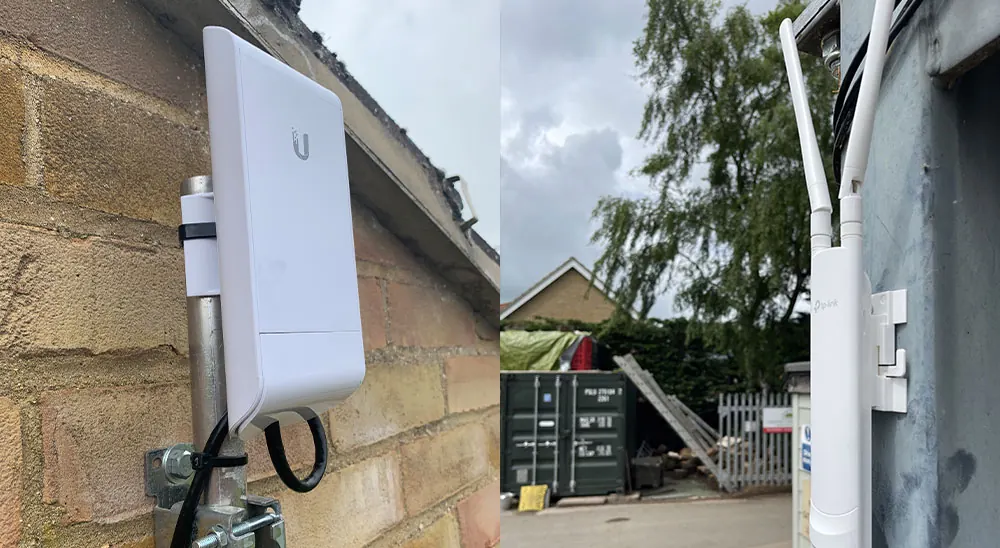
How a wireless bridge carries network traffic
A point-to-point system uses a radio at the main network and another at the remote building. The units are aimed at one another and form a dedicated link, rather than asking a phone or laptop to connect across the whole distance. At the far end, the remote unit usually connects by Ethernet to a switch, access point or directly to a device.
The radios do not create internet service by themselves. The building at the starting end still needs a working broadband connection and router, and the receiving end needs suitable local Wi-Fi if people are to use phones or laptops. Thinking of the bridge as a cable replacement helps clarify what it does and what extra equipment is required.
This arrangement is useful where trenching would be disruptive or expensive, or where a long cable route is impractical. It can connect an office, outbuilding or workshop, but the result depends on the radio path and on the network equipment at both ends.
Check the route and line of sight
A clear visual path is a helpful starting point, but trees, roofs, metal cladding and future building work can affect radio performance. Survey from the intended mounting positions, not just from ground level. The path should include clearance around the direct route, sometimes described as the Fresnel zone, to limit obstruction-related signal loss.
Distance alone does not determine whether a link will work well. The radio band, antenna design, local interference, channel width and alignment all matter. A product advertised for a long range is not a promise of a particular speed at every property. Confirm the expected usable capacity against the tasks planned at the remote end.
Consider seasonal changes too. A line that looks open in winter may be screened by leaves in summer, while new machinery, vehicles or storage can obstruct a low-mounted radio. Where the route is marginal, a survey can identify a better mast position or show that a cable is the more dependable option.
Mounting, weather and power
Both devices need a stable fixing and careful alignment. A small movement from wind, a loose bracket or work on the building can degrade a narrow link, so use appropriate mounts and fixings for the surface. Keep equipment accessible for inspection without placing it where ladders or roof access create unnecessary risk.
Outdoor-rated equipment is designed for exposure, but connectors and cable entries still require correct weather protection. Use the manufacturer’s specified cable, glands and drip loops, and bond or protect equipment as required by the installation. Outdoor cable routes should avoid damage from sharp edges, water traps and routine vehicle or ladder movement.
Check how each radio is powered. Many use Power over Ethernet from an injector or compatible switch, but power standards and budgets vary. A remote building may need a local power supply for the access point and switch even when the bridge itself receives power over its network cable.
Capacity, security and network layout
Estimate simultaneous use rather than relying on a single speed test. Video calls, file transfers, cloud backups and CCTV streams all share link capacity. Account for the bridge’s real throughput, not its advertised wireless PHY rate, and leave headroom for busy periods. If traffic includes cameras or business systems, keep their network needs in the design.
Secure the bridge using current supported encryption and change default administrative credentials. Keep firmware maintained and restrict management access to trusted devices. If the remote building is used by guests or contains business equipment, separate networks or VLANs may help limit access, provided the router and switches are configured consistently.
Plan the remote hand-off. A single access point may suit a small office, while a larger workshop may need multiple wired access points. Avoid placing the access point beside the bridge radio if a cable can position it centrally. Good indoor coverage is a separate design problem from making the inter-building link.
Testing and choosing an installer
A useful commissioning check measures link quality, throughput in both directions, latency and stability under normal use. Test from the remote network, not only from the radio management page. Confirm that roaming, printers, cloud services and any cameras behave as expected, then record device locations and configuration details for future maintenance.
Ask what happens if trees grow, a radio fails or a building changes. A practical design should allow access for servicing and make clear which equipment belongs to the bridge versus the local Wi-Fi. Where a link is business-critical, consider whether a wired backup or alternative connection is needed.
An installer can assess the route, mounting and network hand-off before equipment is purchased. Share the distance, building use and expected number of users. That makes it easier to select equipment based on the actual task rather than range claims alone.
Have a question about your own property? Contact our Mildenhall team.
Related services
Services this guide covers
Point-to-point Wi-Fi links
Wireless bridges that carry your network to a garden office, workshop, barn or second building without digging a trench.
Find out more
Wi-Fi and networking
Whole-property Wi-Fi, outdoor coverage, wired network points, data cabinets and wireless links between buildings.
Find out more
Rural broadband
Fast, reliable internet for rural homes and businesses using 4G, 5G and Starlink, with planning, installation and support.
Find out more
FAQs
Frequently asked questions
Want advice for your own home or business?
Call our Mildenhall team or send an enquiry and we will talk through the options.
Enquiries
Ask us a question or get a quote
Tell us a little about your property and what you need. We will get back to you to talk it through.
- 01638 515551
- info@solarsat.co.uk
- Phones and email Monday to Saturday, 8:30am to 6pm
- 8 High Street, Mildenhall, Suffolk IP28 7EQ. Showroom visits by appointment.